This morning, we launched Dome Managed Agents into preview. Dome now runs those agents for you, and governs them the same way as any other agent.
Dome's managed agents enable rapid paths to productivity gains for business teams while maintaining operational control within the platform team, and general IT policy. In other words... not unleashing the chaos of 'everyone has their own todo list app'.
A Dome Managed Agent essentially means a user can:
- describe the job as a prompt
- pick (or be assigned) a model
- connect (or have pre-provisioned) tools
- runs the agent against a trigger (such as a timer)
As agents are hosted then domain experts can start running agents quickly. And everything runs through Dome then the agent is fully-governed from the first run.
Enterprises want this kind of experience for their teams. What holds them back is the development of the services necessary to manage agents at any kind of scale: which tools may the agent call, and with what arguments? What may it spend? Who holds its keys? What did it actually do last Tuesday? A platform team has to answer those questions for every agent in production.
And a lot of those questions aren't easy. Ask a team what agents it wants and the list fills with scheduled jobs that need some judgment: summarize yesterday's pull requests, brief me before my 9am, triage the overnight tickets, draft Friday's release notes. Each is a system prompt, a model, a few tools and a schedule. Today each still needs somewhere to run, or it runs on someone's laptop, or an unsanctioned surface.
What a managed agent is
A managed agent is a system prompt, a model or pool, one Gateway and a trigger. Dome runs the loop: it calls the model through the Broker, sends each tool call through the Gateway, and repeats until the job is done or a limit is reached.
The smallest one fits in a command, and can also be built in the Dome UI:
dome managed-agents create --name haiku \  --system-prompt "Write one haiku about Godzilla." \  --model claude-sonnet --gateway haiku
dome managed-agents run haiku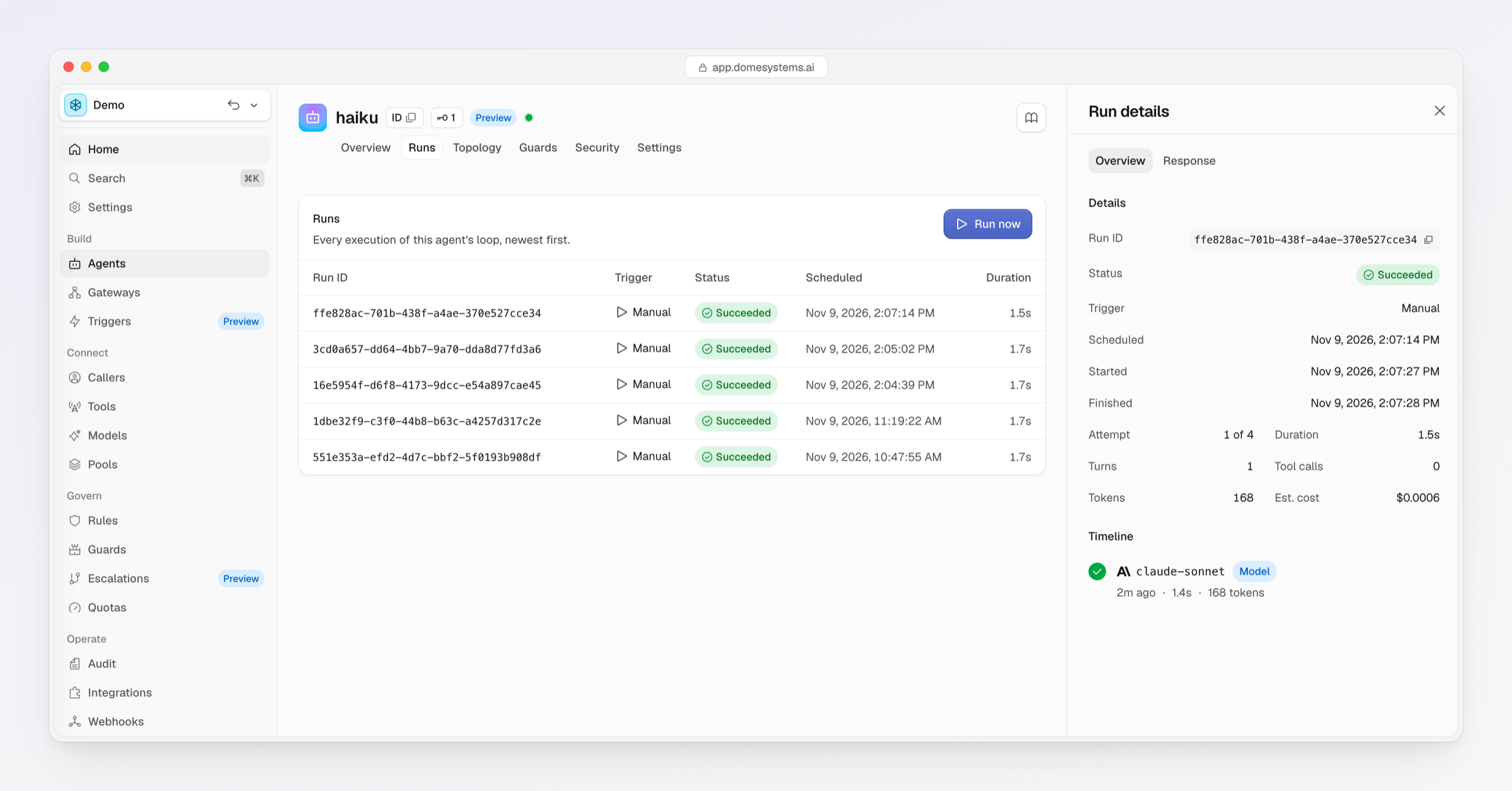
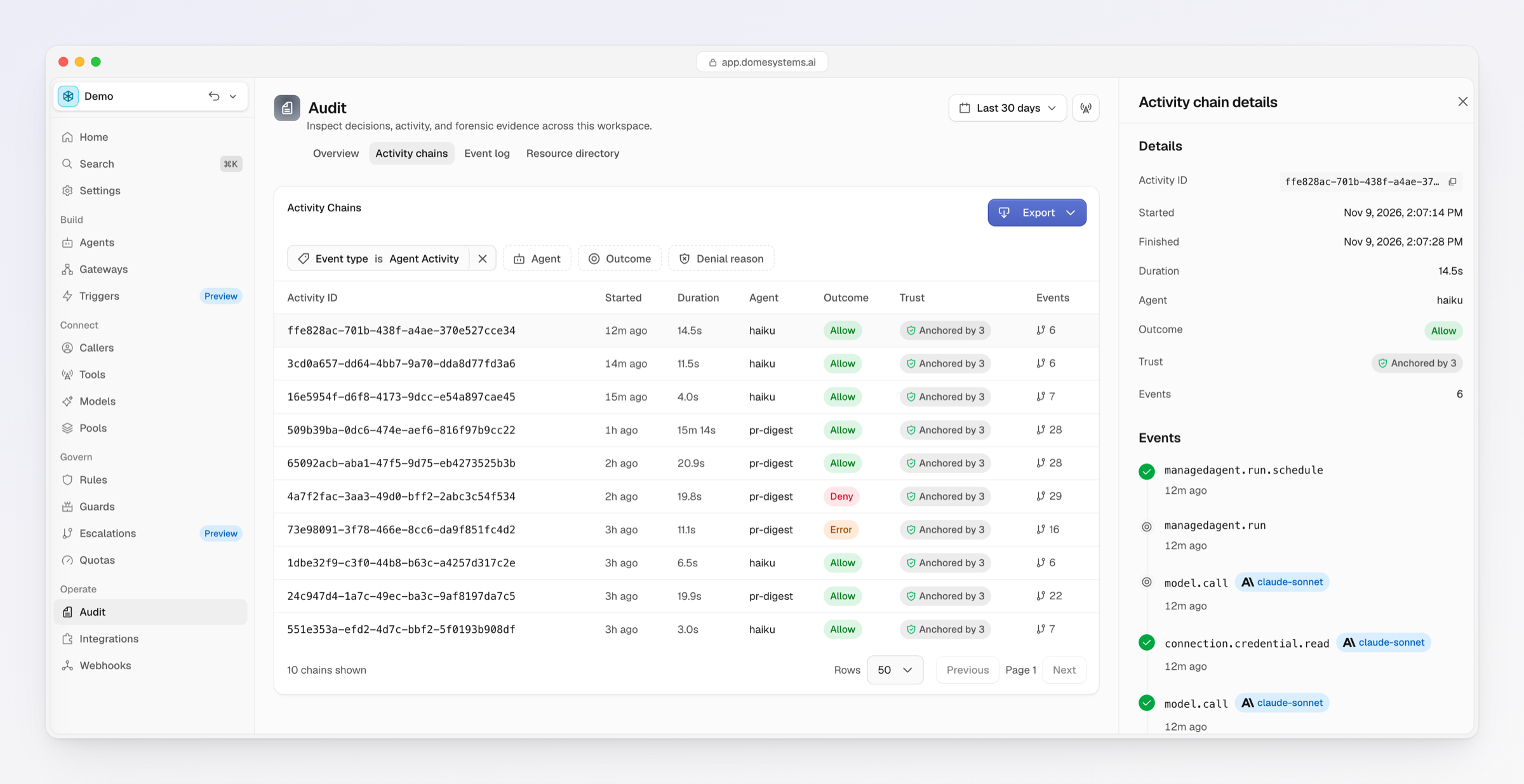
A useful one isn't much bigger. Our detailed walkthrough builds an agent that reads the pull requests merged since its last run every weekday at 8am and writes a digest to Notion. Its rules make GitHub read-only and let it create Notion pages under one parent page only. If the model tries to write anywhere else, the call is denied and the audit record names the rule that denied it.
What is in preview
There's a lot to managing agents and handling the myriad ways they can be used. So, for preview, we've enabled many of the most requested capabilities, and over time we'll add more.
- Triggers. A schedule with a cron expression and time zone, a webhook, or manually from the console or CLI.
- Bounded runs. Each run has a maximum number of turns, a per-turn timeout and a total duration. The defaults are 50 turns, 5 minutes a turn and 60 minutes a run.
- Managed credentials. Dome holds the agent's key and the credentials for every tool it reaches. You rotate the key through Dome and never copy it anywhere.
- Consistent governance. The agent has its own Dome identity. Rules decide every model and tool call on its arguments, and Quotas cap what it spends.
- Consistent audit. Each run shows what triggered it, its turns, tool calls, tokens, estimated cost and response, with a timeline of each call and its allow or deny. The same events land in the audit trail as for every other agent.
Nothing about governance changes because Dome is running the loop. A managed agent and an agent you host yourself answer to the same rules, and one audit query covers both.
Availability
Managed agents are in preview. An organization owner or admin turns on preview features under Settings → Organization, or with dome orgs previews enable. Read the walkthrough to build the pull request digest step by step, or see the docs.
Take a look at our docs for more information on managed agents and everything else Dome, and let us know if you find it useful.