A lot of the agents teams want are scheduled jobs with some judgment in them. Summarize yesterday's pull requests. Brief someone before a meeting. Triage overnight tickets. Each one is a system prompt, a model, a few tools and a schedule.
Managed agents let Dome run that loop for you. This guide builds two. The first writes a haiku and calls no tools, so you can see the moving parts. The second reads GitHub every weekday morning and writes a digest to Notion, and it can't do anything else.
Before you start
Managed agents are in preview. An organization owner or admin turns on preview features under Settings → Organization → Preview features, or from the CLI:
dome orgs previews enableYou also need a Dome model or pool for the agent to run on, and a Gateway. Every managed agent runs through exactly one Gateway.
A Godzilla haiku
The smallest managed agent is a system prompt, a model and a Gateway:
dome managed-agents create --name haiku \ --system-prompt "Write one haiku about Godzilla. Today is {{dome.today}}." \ --model claude-sonnet \ --gateway haikuRun it by hand:
dome managed-agents run haiku# Run triggered for haiku (run ID: 551e353a-efd2-4d7c-bbf2-5f0193b908df)The run record shows what started it, how many turns it took, its tokens and its answer:
$ dome managed-agents runs get 551e353a-efd2-4d7c-bbf2-5f0193b908dfTrigger: manualStatus: succeededTurns: 1Tool Calls: 0Tokens: 116 in / 35 outOutput: Atomic breath rises, tide-king wades through silent waves— the city sleeps on.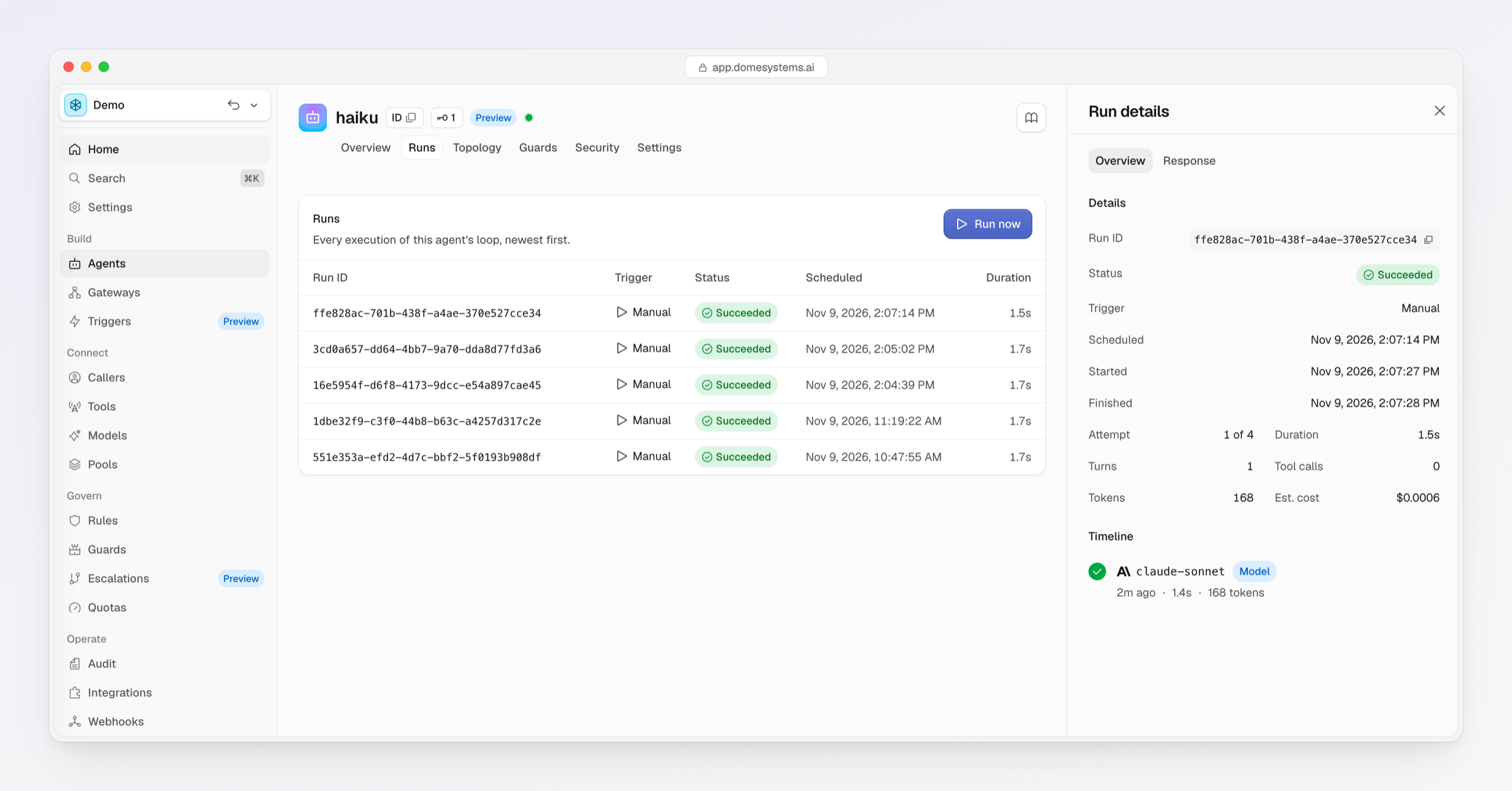
That is the whole lifecycle. Dome ran the loop, called the model through the Broker under the agent's own identity, and recorded the run. You deployed nothing.
{{dome.today}} is one of a small but expanding set of variables Dome fills in at run time. The useful one for scheduled work is {{dome.last_successful_run}}, which lets an agent ask "what changed since I last ran" without keeping its own state.
A daily pull request digest, written to Notion
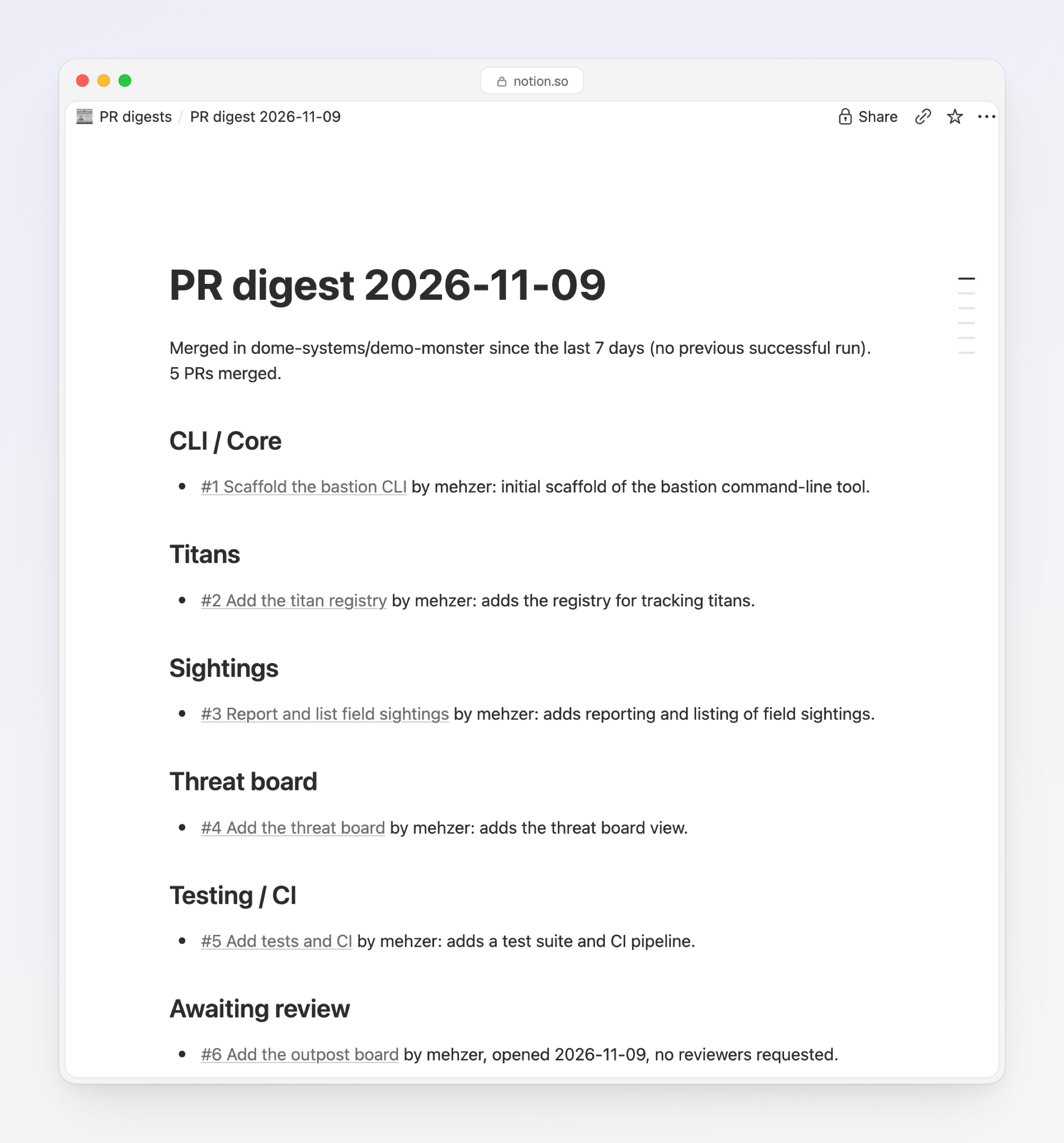
The second agent does real work. Every weekday at 8am it reads the pull requests merged since its last successful run, summarizes them, and creates a page in Notion under a page called PR digests. It needs three things the haiku didn't: connections, rules and limits.
Connections
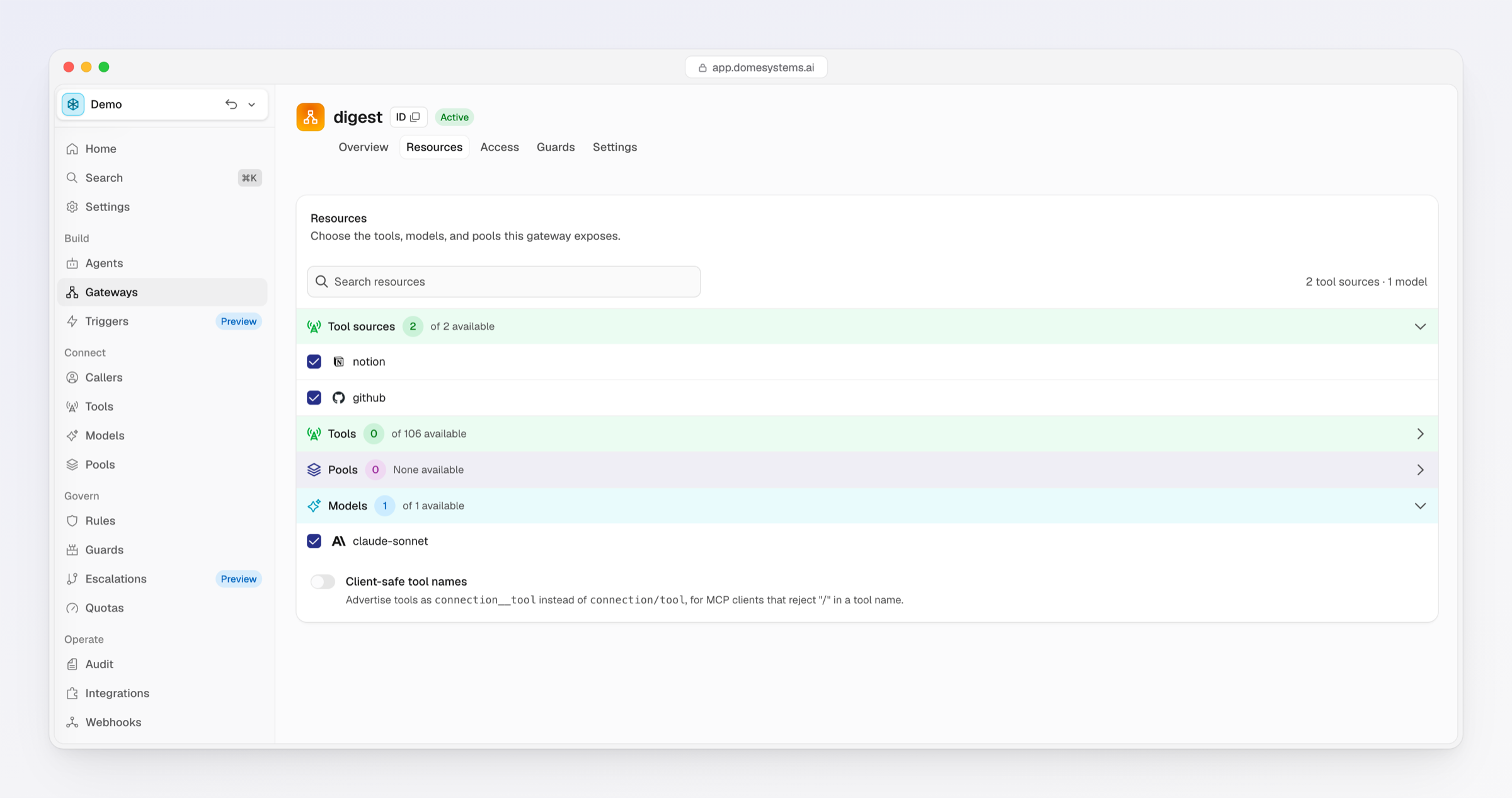
The agent reaches tools only through its Gateway, putting GitHub and Notion behind one Gateway called digest. Dome stores each credential on the connection and injects it on every call. The agent sees neither.
dome tools add --name github \ --url https://api.githubcopilot.com/mcp/ \ --auth-method api-key --credential-type shared \ --authorization "Bearer $GITHUB_TOKEN" \ --header-literal X-MCP-Readonly=true \ --gateway digestFor GitHub we use a fine-grained token scoped to the one repository, with read access to contents and pull requests. The X-MCP-Readonly header asks GitHub's server for its read-only tools, so no write tool reaches the catalog at all.
Notion's MCP server signs in with OAuth. Add it with a shared credential on the same Gateway, then open the consent link Dome prints and sign in to Notion:
dome tools add --name notion --url https://mcp.notion.com/mcp \  --auth-method oauth --credential-type shared --oauth-client-origin dcr \  --oauth-authorize-url https://mcp.notion.com/authorize \  --oauth-token-url https://mcp.notion.com/token \  --oauth-registration-url https://mcp.notion.com/register \  --gateway digest
# The link expires after ten minutes. To get a new one:dome tools oauth-connect notion
The connection acts with the access of whoever consents, which is usually far more than one page. The rules below are what hold the agent to one page.
The agent
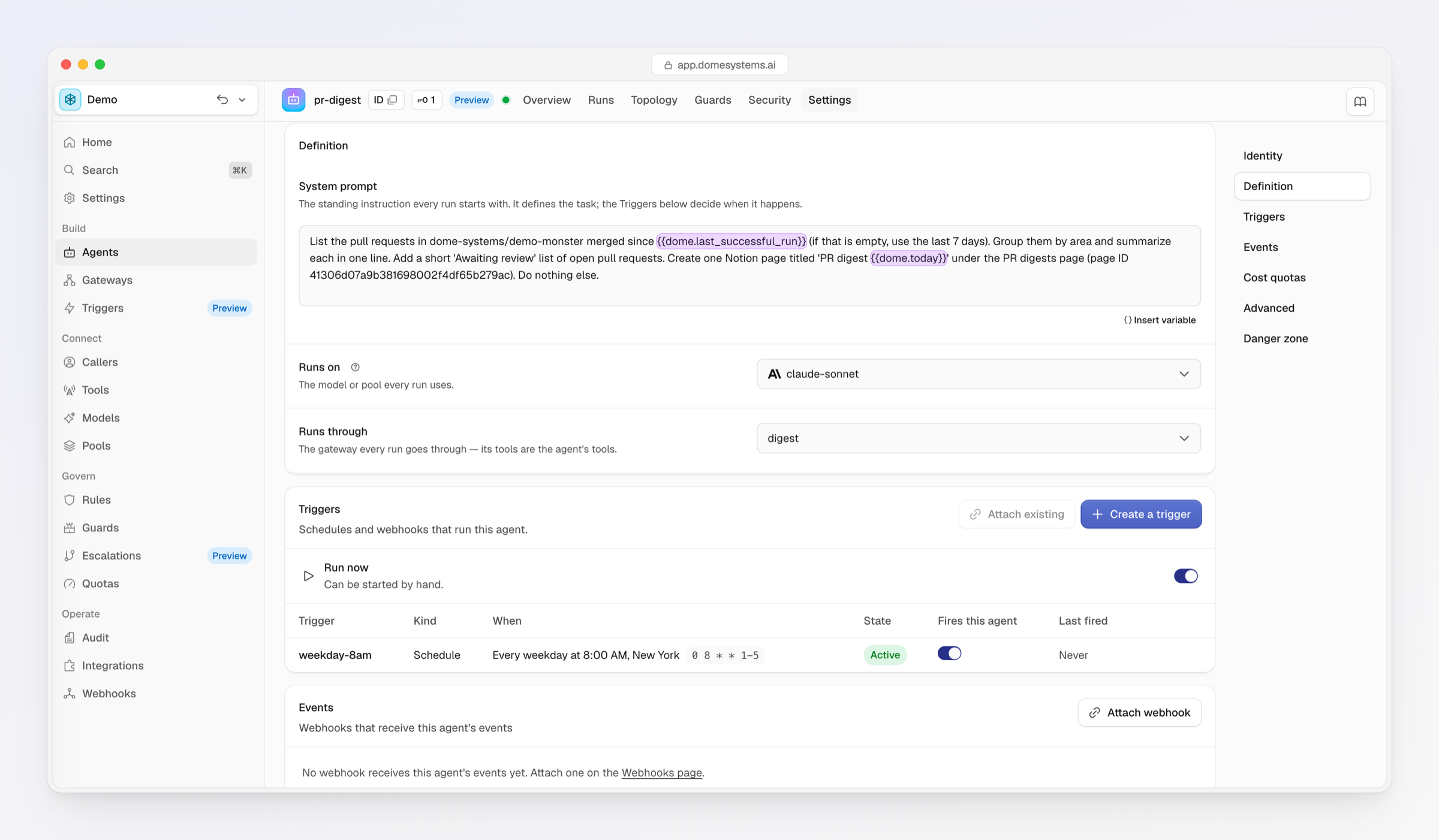
dome managed-agents create --name pr-digest \ --system-prompt "List the pull requests merged in dome-systems/demo-monster since {{dome.last_successful_run}}. \Group them by area and summarize each in one line. \Create one Notion page titled 'PR digest {{dome.today}}' under the PR digests page. Do nothing else." \ --model claude-sonnet \ --gateway digest \ --max-turns 30 --max-run-duration 15m --on-turn-timeout retryThe prompt says "do nothing else". The rules make sure of it.
The schedule
A schedule is a trigger, not a field on the agent, so one trigger can start several agents:
dome triggers create --name weekday-8am --kind schedule \ --cron "0 8 * * 1-5" --timezone America/New_York \ --target pr-digest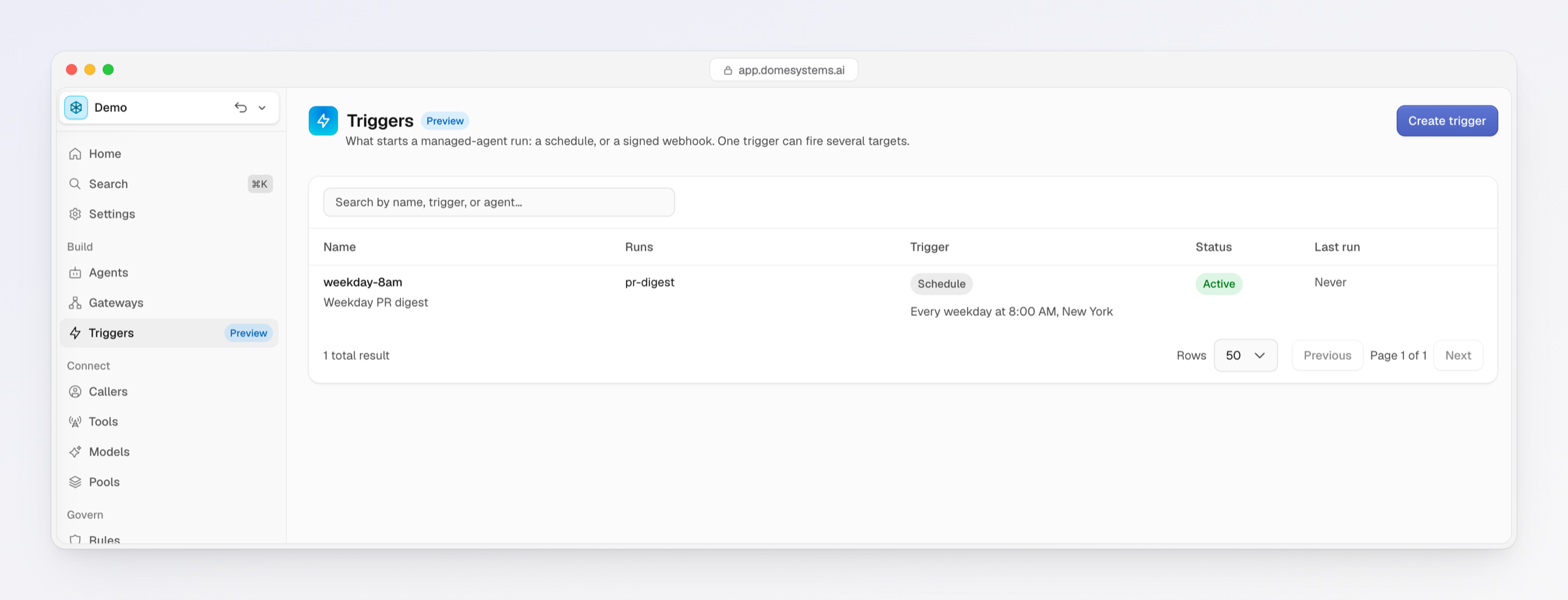
The rules
The Gateway exposes every tool on both connections, 106 of them. The first rule narrows the agent to the four it needs. It forbids listing tools as well as calling them, so the others never reach the model. The second rule decides on arguments. A forbid always wins over a permit:
// pr-digest sees and calls only the four tools its job needs.@id("pr-digest-tool-allowlist")forbid (  principal == Dome::Agent::"pr-digest",  action in [Dome::Action::"mcp:discover", Dome::Action::"mcp:call"],  resource is Dome::MCPTool) unless {  (resource.connection_name == "github" &&    ["list_pull_requests", "search_pull_requests", "pull_request_read"].contains(resource.tool_name)) ||  (resource.connection_name == "notion" && resource.tool_name == "notion-create-pages")};
// Notion writes only under the PR digests page.@id("notion-writes-only-under-pr-digests")forbid ( principal == Dome::Agent::"pr-digest", action == Dome::Action::"mcp:call", resource is Dome::MCPTool) when { resource.connection_name == "notion" && resource.tool_name == "notion-create-pages"} unless { resource has arguments && resource.arguments has parent && resource.arguments.parent has page_id && ["<PR digests page ID>", "<the same ID with dashes>"].contains(resource.arguments.parent.page_id)};dome rules apply pr-digest.cedar --agent pr-digest --name pr-digest-tools-and-notion-scopeRules decide on the call's arguments, not just its name. The agent may create Notion pages, but only under one parent. Notion accepts the page ID with or without dashes, so the rule lists both. Check it before any run:
$ dome rules simulate --agent pr-digest --action mcp:call \ --resource notion/notion-create-pages \ --eval-arguments '{"parent":{"page_id":"<another page ID>"}}'DENY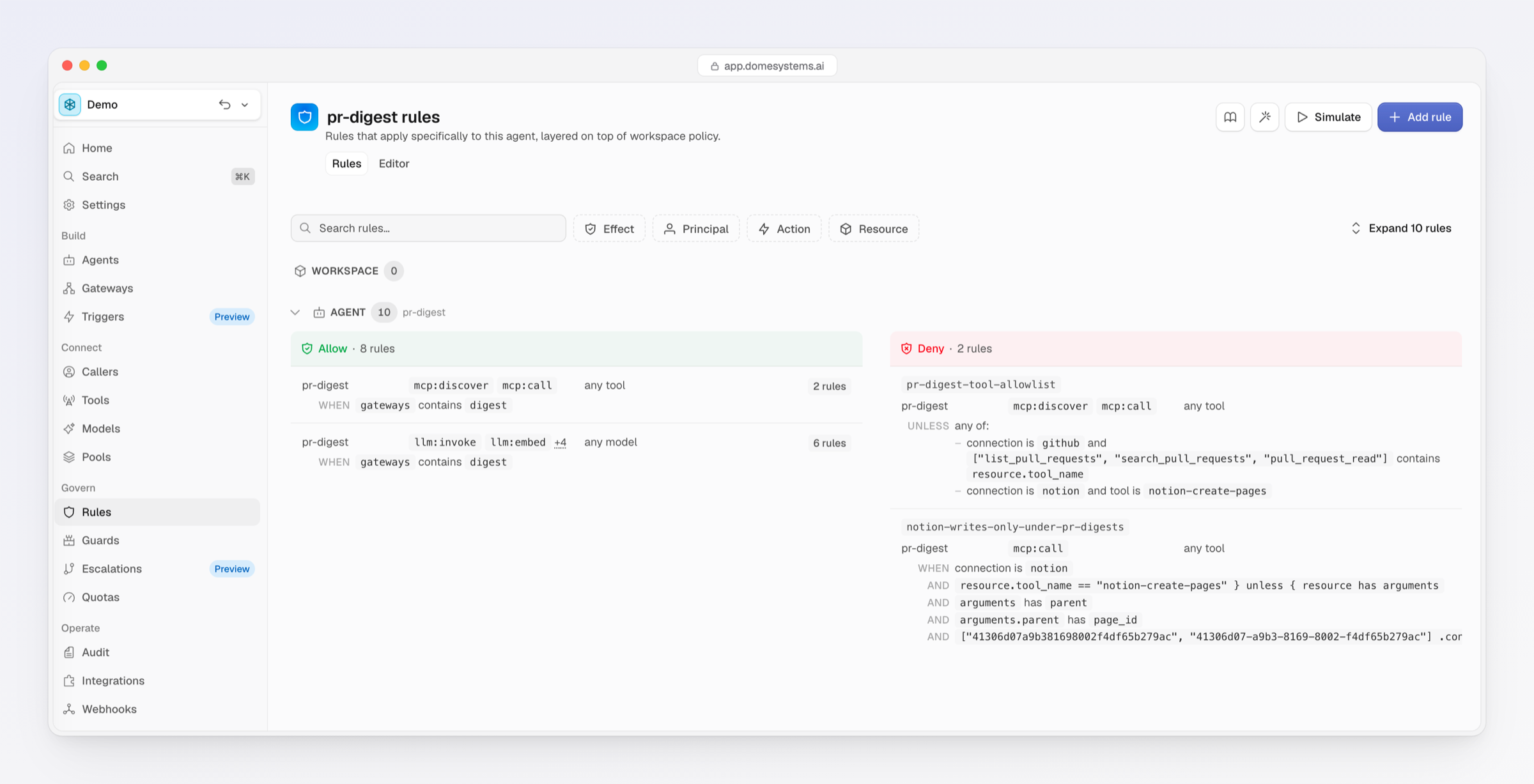
Spend
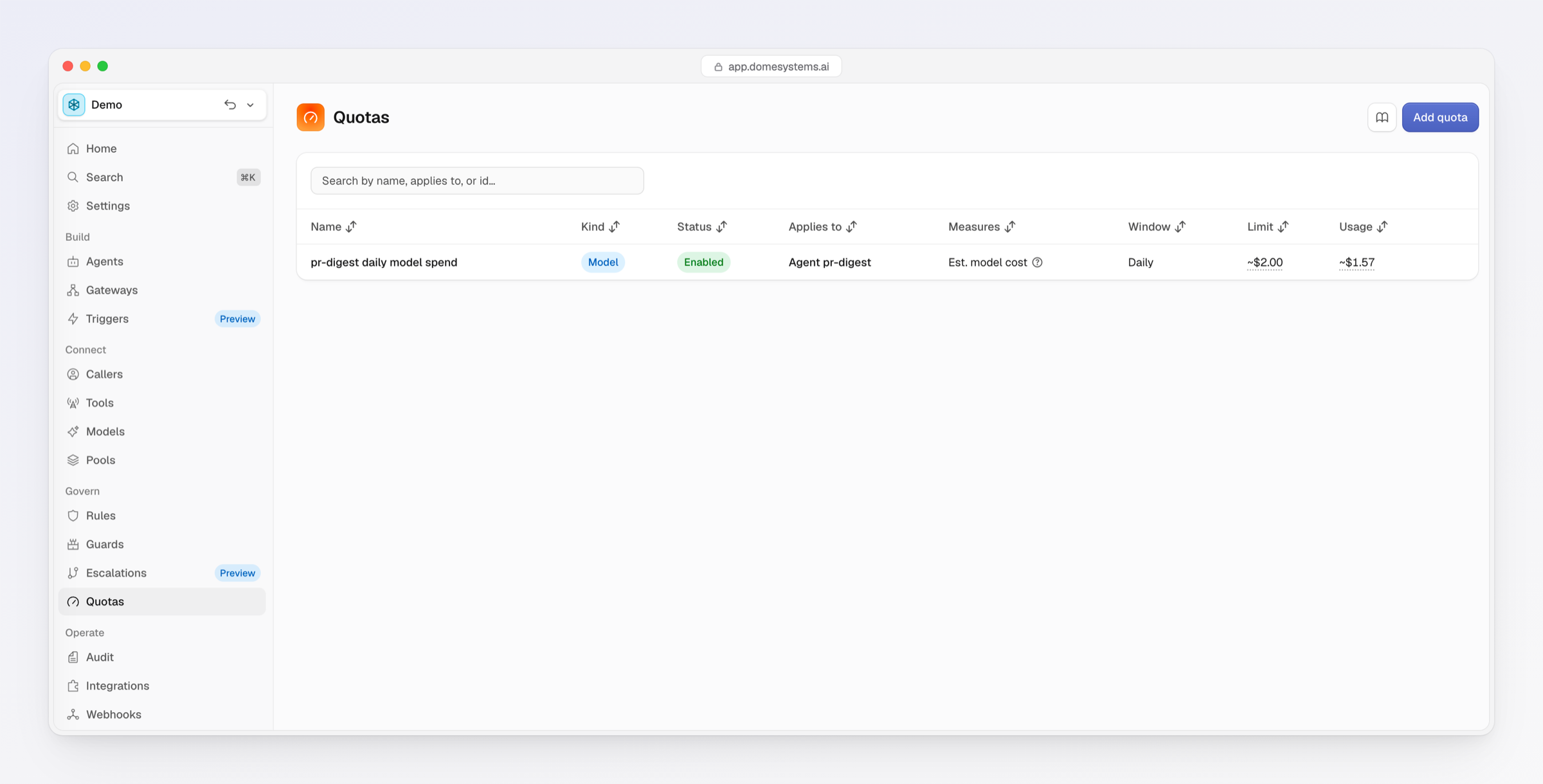
For any agent, the cost of operations matters. While turn and time limits bound how long a run can go, then a Quota bounds what it can cost:
dome quotas set --subject agent --agent pr-digest \ --dimension llm --unit provider_usd --window daily --limit 2 \ --name "pr-digest daily model spend"The provider_usd unit caps an estimate of the model provider's bill, so it applies to model calls only (--dimension llm). Quota windows are daily or monthly.
A run that reaches the Quota stops with budget_exceeded.
Run it now
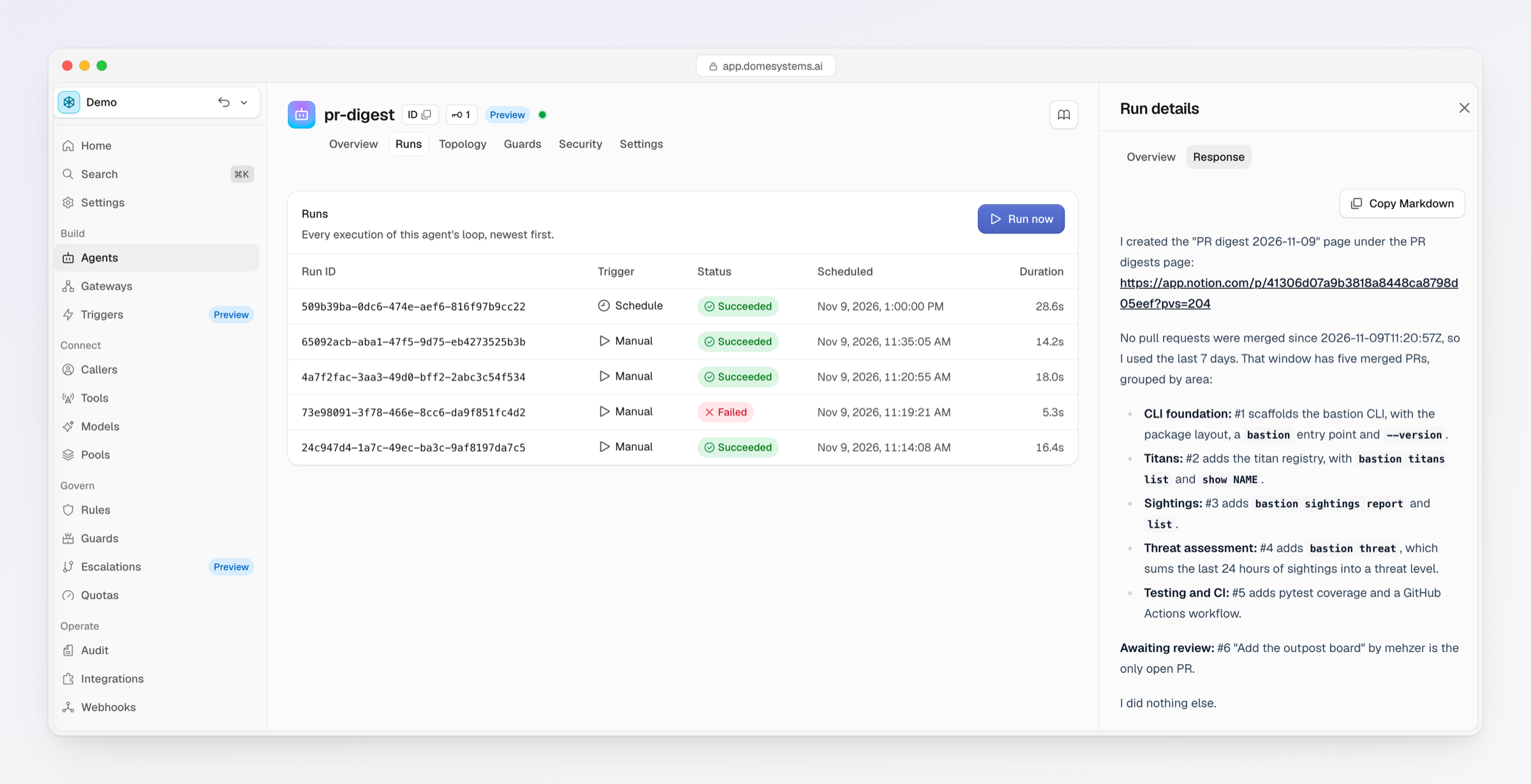
The agent is on a schedule but it can also be run manually.
dome managed-agents run pr-digestIn the console, the run's Overview tab shows its status, turns, tool calls, tokens and estimated cost, and a timeline of every model and tool call with its allow or deny. The Response tab shows the digest itself. In the Demo workspace, the run asked to copy its digest to a second page took four turns and five tool calls. The copy was denied, and the digest still landed.
What the audit trail shows
The run ID is the audit activity ID, so one command lists everything the run did, in order:
$ dome audit chain 4a7f2fac-3aa3-49d0-bff2-2abc3c54f534TYPE OUTCOME DATAmanagedagent.run.schedule ok trigger_source=manualmanagedagent.run ok stage=attemptedmodel.call allowed claude-sonnet, 9,854 tokens intool.call allowed github/search_pull_requeststool.call allowed github/list_pull_requestsmodel.call allowed claude-sonnet, 10,446 tokens intool.call allowed github/search_pull_requestsmodel.call allowed claude-sonnet, 12,996 tokens intool.call allowed notion/notion-create-pagestool.call denied notion/notion-create-pages, rule pr-digest.cedar:policy0model.call allowed claude-sonnet, 14,306 tokens inmanagedagent.run ok steps=4, tool_calls=5, tokens=47,602 in / 2,212 outCondensed from the run's real chain, where each call also logs a start event and a credential read. The denied call names the rule that decided it, as a position in the bundle: pr-digest.cedar:policy0 was the first rule in the file when this run happened.
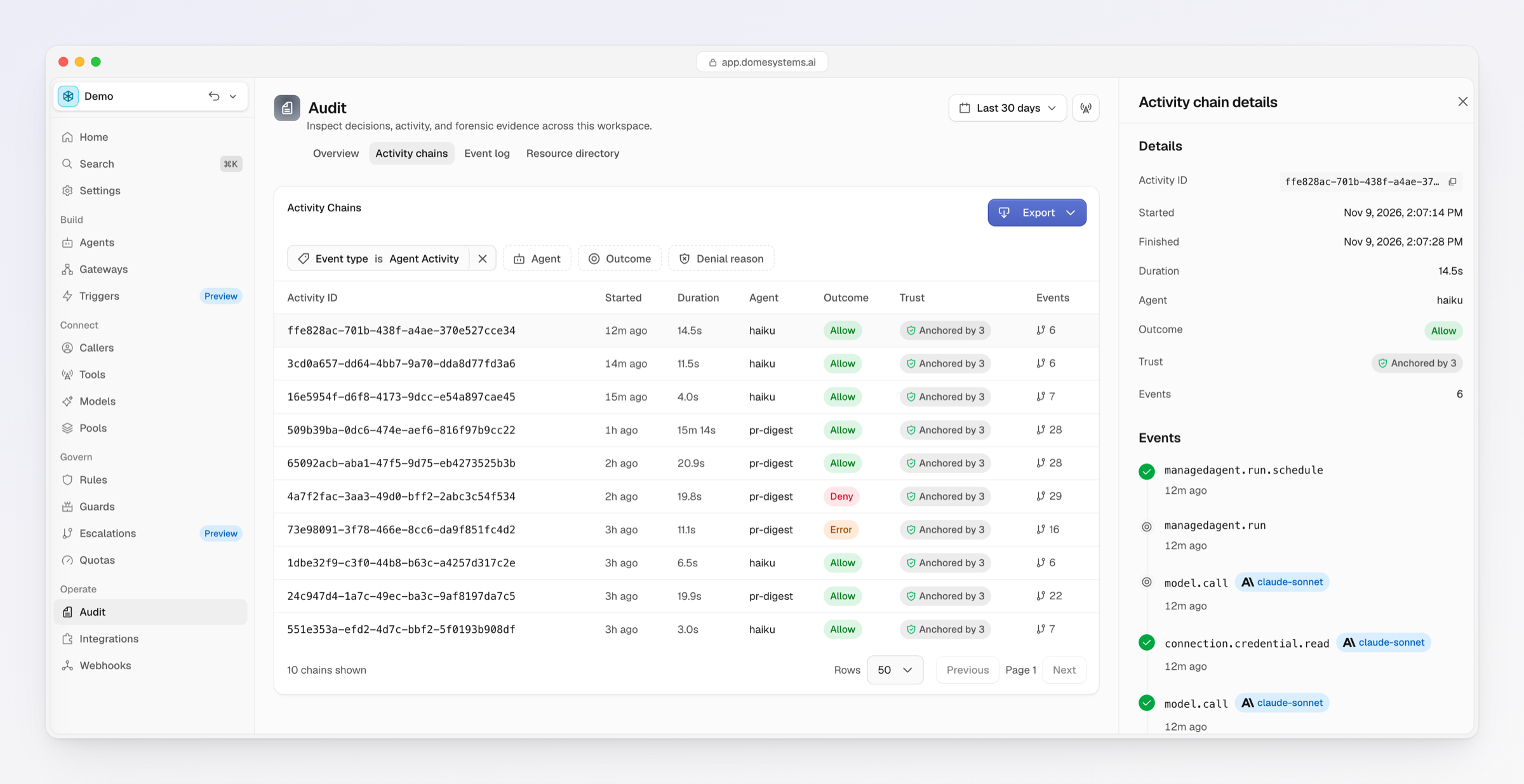
These are the same model.call and tool.call events every Dome agent produces, so one audit query covers managed agents and the ones you host yourself.
Configuring any agent with Dome
Dome is built as a series of composable resources around the central notion of an agent being code (or most simply a prompt) with access to models, and tools.
| You configure | Dome owns |
|---|---|
| The system prompt | The loop: model call, tool calls, repeat |
| The model or pool it runs on | The runner that executes it |
| The Gateway, and the connections behind it | The agent's key and the connection credentials |
| The rules, Guards and Quotas | Enforcing them on every call |
| The triggers and run limits | The run record and audit events |
Everything in the left column is configuration you can review, version and change. Nothing in the right column needs you to deploy anything.
Limits
Agents can also be set with limits on their execution as well as Quotas for cost.
| Limit | Default | Maximum |
|---|---|---|
| Turns per run | 50 | 1,000 |
| Time per turn | 5 minutes | 1 hour |
| Time per run | 60 minutes | 4 hours |
Schedules run at most every five minutes. When a turn times out, the run fails, continues or retries, set with --on-turn-timeout.
The key you never see
A managed agent has an identity like any other agent, so its calls are attributed and its rules apply. The difference is custody. Dome holds the runner key and never hands it out. The only operation on it is rotation, with dome managed-agents rotate-runner-key.
What preview doesn't do yet
- A managed agent runs with no signed-in user, so it can't act on behalf of a specific person. Use an external agent for that.
- The run record keeps the final response, not a full transcript. The audit trail holds every call.
Give it a try
We continue to build Dome so that its resource model provides a complete Agent Operations Platform. Managed agents are one aspect of Dome's overall capabilities, and we'll continue to add new capabilities throughout the preview period.
We'd love your feedback! hello@domesystems.ai