
Agents Need to Talk to Your Systems
A Field Guide to Dome's MCP Gateway
Introduction
An agent that cannot reach a real system is a demo. The moment it becomes useful, it needs your ticketing system, your CRM, your repositories, your data warehouse — and the naive way to arrange that is to put a credential in the agent's environment and let it call the backend directly.
That works for one agent. At twenty it produces a specific set of problems: every agent holds a long-lived key it does not need, the key is scoped to the whole backend rather than the three operations the agent actually performs, nobody can say which agent called what, and tool discovery hands every agent the full capability surface of every system it can see. None of these are exotic failures. They are the default outcome of direct access.
Dome's answer is to make the tool call a governed hop. The agent addresses one Dome endpoint, Dome decides whether the call is allowed, fetches the real credential server-side, makes the upstream call, inspects what comes back, and records the whole thing. The agent holds no backend credential at any point.
This guide covers the configuration surface rather than the internals. Its companion, Agents Need to Talk to Models, does the same for model traffic.
Throughout, a Gateway is the named access surface you create and grant. Gateways are logical rather than physical — you create as many as the shape of your estate needs, and a resource that sits in no Gateway is unreachable until you add it to one.
What a governed tool call is
A Gateway is a named access surface with two relationships: membership — which tools, tool sources, model pools, and model connections belong to it — and an access grant — which agents may call it. It exposes one stable URL for that combination.
An agent points an MCP client at the Gateway URL and appends the protocol suffix:
| Traffic | Path | Notes |
|---|---|---|
| Tool calls | https://<host>/gateways/<id>/mcp | MCP Streamable HTTP session and JSON-RPC frames |
| Model calls | https://<host>/gateways/<id>/v1/... | The same Gateway, the other ingress |
The /gateways/<id> segment is not optional. A bare /mcp fails closed with a 400 and a "select a gateway" message, so a misconfigured client cannot accidentally reach a default surface.
Every request then passes three independent checks, and the decision is the conjunction of all three.
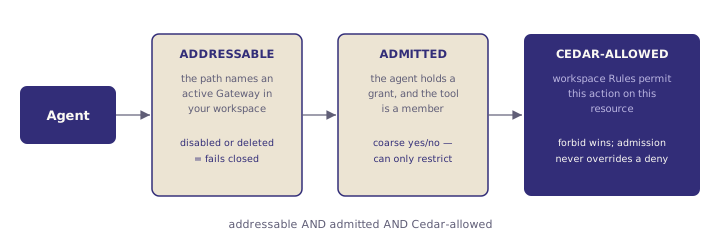
Two consequences are worth internalising early, because most configuration decisions follow from them.
A resource in no Gateway is unreachable. That is a structural boundary that runs before any policy evaluates. It means you can take a system off the table for every agent by detaching it, without touching a rule.
Discovery is part of the boundary. tools/list returns only the tools that are members of the addressed Gateway and that Cedar permits. An agent that should not call a tool does not see it in the catalog — it gets a shorter list, not a forbidden entry. Discovery is exempt from the admission grant specifically so a client can enumerate before it is fully wired, but it stays membership- and Cedar-filtered throughout.
Connecting a system
Registering a system is one command with three decisions inside it: how Dome reaches the upstream, how Dome authenticates to it, and what Dome sends alongside each call.
Transport
| Protocol | Flag | Use for |
|---|---|---|
| MCP Streamable HTTP | --protocol streamable-http (default) | MCP-native backends reachable over HTTP. Sessions externalise to Redis so data-plane instances stay interchangeable. |
| Stdio | --protocol stdio with --command and --arg | Local or sidecar backends the data plane spawns as a child process. |
| REST catalog | — | Non-MCP HTTP services, exposed to agents as MCP tools. |
Streamable HTTP is the default and the right answer for anything running as a service. Stdio matters when the backend is a binary you ship next to the data plane rather than a service you host.
Authentication
Two dimensions combine, and the pairing is the most consequential choice you make about a connection.
| Dimension | Values | Question it answers |
|---|---|---|
--auth-method | none, api-key, oauth | What credential does the upstream expect? |
--credential-type | shared, per-user | Is there one credential for everyone, or one per end user? |
Shared provisions one credential once, and every agent and every end user calls the upstream through it. The upstream sees a single service identity. Use it when the upstream does not need to know which human is behind the call, or when access is scoped at the workspace level anyway.
Per-user gives each end user their own credential. The first time an agent calls the connection on someone's behalf, Dome returns a structured dome.credential_required error carrying a provisioning URL; the same URL surfaces in tools/list under _meta.dome.auth_required. The user completes consent against the upstream once, their tokens are stored under their identity, and the next tools/list reflects the freshly provisioned backend. There is no admin connect step.
The decision is usually made for you by the upstream. If the backend enforces its own row-level access, attributes actions to individual users, or applies per-user quotas, per-user preserves all three; shared flattens them into one service account and throws away the distinction the upstream is trying to make. If the backend has none of those properties, shared is less machinery for the same result.
dome tool add \
  --name warehouse \
  --url https://mcp.warehouse.internal/mcp \
  --auth-method api-key \
  --credential-type shared \
  --authorization "Bearer $WAREHOUSE_TOKEN" \
  --gateway prod-tools
Use --authorization for the API key, not --header-secret. Dome injects the managed Authorization header itself, and the Authorization key is reserved in the advanced --secret-value bundle. Rotating that token later is dome tool update warehouse --authorization "Bearer $NEW".
OAuth
OAuth connections carry the client configuration on the connection. The one flag worth understanding is --oauth-client-origin:
| Origin | Meaning | When |
|---|---|---|
manual | You supply --oauth-client-id and --oauth-client-secret | You have registered an OAuth app with the upstream yourself |
dcr | Dome registers a client dynamically via the upstream's RFC 7591 endpoint | The upstream supports dynamic client registration |
--oauth-token-endpoint-auth defaults to auto, which discovers the upstream's preferred method from its RFC 8414 metadata. Override to client_secret_basic or client_secret_post only when discovery is wrong or absent.
dome tool add \
  --name notion \
  --url https://mcp.notion.com/mcp \
  --auth-method oauth \
  --credential-type shared \
  --oauth-client-origin manual \
  --oauth-authorize-url https://api.notion.com/v1/oauth/authorize \
  --oauth-token-url https://api.notion.com/v1/oauth/token \
  --oauth-client-id "$NOTION_CLIENT_ID" \
  --oauth-client-secret "$NOTION_CLIENT_SECRET" \
  --oauth-default-scope read_content \
  --oauth-default-scope update_content \
  --gateway prod-tools
For a shared OAuth connection, add prints the admin consent URL automatically; dome tool oauth-connect notion reprints it if the flow could not start. The URL is single-use and valid for about ten minutes. Tokens land in Vault on the callback.
dome tool oauth-disconnect deletes the Vault token bundle and revokes the user-grant row but deliberately preserves the client configuration, so a later oauth-connect reuses the same registered client. It is idempotent, which makes it safe in teardown scripts.
Per-user OAuth connections skip oauth-connect entirely — consent is triggered per end user on first call.
Outbound headers
Three header types attach to a connection, and the third is the one most teams miss.
| Flag | Shape | Sends |
|---|---|---|
--header-literal | Name=Value | A fixed value |
--header-secret | Name=SecretKey | A value resolved from Vault at call time |
--header-actas | Name | The verified X-Dome-Act-As assertion |
--header-actas reinjects the verified acting identity into the upstream call. That lets the backend do its own per-user authorization against a claim it can trust, without you moving to per-user credentials and without the agent being able to forge the value — Dome verified it before the call left. It is the cheapest way to preserve end-user attribution through a shared-credential connection.
dome tool header add appends to the header list; the --header-* flags on dome tool update replace it wholesale. Reach for header add when you are extending a live connection.
Write marking
One more flag shapes how the rest of the system treats the connection:
dome tool update warehouse \
  --write-tools "create_order,cancel_order,adjust_inventory"
--write-tools marks which tools mutate state. That classification flows through to risk indicators in the dashboard, and gives you a natural axis for the blast-radius pattern later in this guide.
Composing a catalog
A Gateway's tool membership can be built two ways, and they behave differently as the upstream changes.
| Approach | Command | Behaviour when the upstream adds a tool |
|---|---|---|
| Pinned tools | dome gateway tools add <vg> <tool-id> | The new tool does not appear. Membership is an explicit list. |
| Propagating source | dome gateway tool-sources add <vg> <connection> | The new tool joins the Gateway automatically. |
This is the central trade-off in catalog composition. A propagating source is one command and stays current — when the vendor ships a new tool, your agents can use it. A pinned list means an upstream release cannot widen what your agents can reach without someone deciding to widen it.
Pick propagating sources for upstreams you control or trust, and pinned tools for third-party MCP servers where a vendor release is effectively an unreviewed change to your agents' capability surface. Mixing them on one Gateway is fine: tool-sources add the internal servers, tools add the specific operations you want from the vendor's.
Attaching at create time saves a step — --gateway is repeatable on dome tool add and adds the connection as a tool source.
The catalog as a control surface
Dome keeps a persistent catalog of every tool it has observed on a connection. It survives restarts and stays queryable without a live data plane.
dome tool catalog list notion --seen-since 7d
dome tool catalog list notion --with-schema --show-blocked
--seen-since defaults to thirty days; pass 0 for all time. That window is a useful audit in itself — a tool nobody has called in a month is a candidate for removal.
Three operations turn the catalog into a control:
| Operation | Effect on agents | Use when |
|---|---|---|
catalog block | Filtered out of tools/list; tools/call denied | A specific tool is dangerous and you want it gone regardless of policy |
catalog deprecate | Still visible, still callable; warning surfaces to operators | An upstream has replaced a tool and you want to signal without breaking callers |
catalog restore | Returns to active, clearing block or deprecation | Reversing either of the above |
dome tool catalog block notion delete_page --message "dangerous mass-delete; use archive_page"Blocking is stronger than it looks. It regenerates a workspace-scoped managed Cedar bundle emitting one forbid per blocked tool, and because forbid wins across every scope, the block overrides any permit anyone has written — including a permit on a different Gateway. Blocks also persist across re-observation, so the tool reappearing in the upstream's tools/list does not resurrect it. Blocked-call attempts emit tool.blocked_call_denied, so you can see who is still trying.
Blocking is the right instrument for "this operation should not exist for anyone in this workspace." Detaching from a Gateway is the right instrument for "this agent population should not reach it." They are not interchangeable.
One catalog note for per-user connections: shared connections pre-warm their catalog through the data plane's startup discovery, but per-user connections have nothing to discover with until someone's credential exists. dome tool catalog sync <connection> dispatches exactly one upstream tools/list using the calling admin's own per-user credential. Attach your credential through the normal magic-link flow first. If the workspace's act-as verifier does not use email as the subject, pass --act-as-sub explicitly.
One Gateway, both ingresses
A Gateway is not a "tools" object. The same Gateway holds model pools and direct model connections as members, and serves them at /gateways/<id>/v1. An agent granted one Gateway gets one URL and reaches both its tools and its models through it.
That matters for how you scope: if a set of agents should share a tool catalog and a model configuration, that is one Gateway, not two objects to keep in sync.
Patterns for shaping reach
Every workspace is auto-provisioned with a Default gateway. It is a real, editable, deletable Gateway — new workspaces start with it empty and with no grants, so you attach members and grant access explicitly. For most workspaces it is the only Gateway you need, and keeping it is the right instinct.
The patterns below are ordered by how often they are the right answer.
Pattern 1 — One Gateway for the workspace
A single curated set of tools and models, and every active agent should reach it.
dome gateway tool-sources add default warehouse
dome gateway tool-sources add default github
dome gateway model-pools add default production
dome gateway access grant-all default
access grant-all admits every current and future workspace agent, which means a newly registered agent works without a grant step. It emits a workspace-scoped generated Cedar bundle to express that, and Cedar remains authoritative — open admission cannot over-permit anything a forbid denies. Differentiation between agents then lives entirely in Rules, which is where it is easiest to review.
Use per-agent grants instead of grant-all when the set of agents that should reach this surface is genuinely a decision rather than a default. dome gateway access list <vg> shows the current state; revoked agents are excluded from the list because they cannot exchange a key for a token at all, while suspended agents remain listed because suspension is reversible.
Pattern 2 — Split by audience
Two agent populations with genuinely different jobs. A coding agent needs repositories and CI. A support agent needs tickets and the CRM. Same workspace, no overlap worth sharing.
dome gateway create coding-tools  --description "Repo and CI tools for engineering agents"
dome gateway create support-tools --description "Ticketing and CRM for support agents"

dome gateway tool-sources add coding-tools  github
dome gateway tool-sources add coding-tools  buildkite
dome gateway tool-sources add support-tools zendesk
dome gateway tool-sources add support-tools salesforce

dome gateway access grant coding-tools  repo-reviewer
dome gateway access grant support-tools ticket-triager
You could express this with Rules on one Gateway, and for two agents you probably should. The case for two Gateways strengthens as the populations grow: the membership list becomes the reviewable artifact, a new engineering agent needs one grant rather than a rule, and nobody has to read Cedar to answer "what can support agents reach?"
Pattern 3 — Split by environment
Production models and tools on one Gateway; evaluation or shadow pools on another. The point is not policy — it is that an agent cannot mix them by accident, because reaching the eval pool requires addressing a different URL.
dome gateway create eval --description "Shadow pools and eval harness tools"
dome gateway model-pools add eval shadow
dome gateway access grant eval eval-harness
This is the pattern where the structural boundary earns its keep. A misconfigured model name cannot route production traffic to a shadow pool if the shadow pool is not a member of the production Gateway.
Pattern 4 — Split by client type
Human-operated MCP clients and automated agents should often see different catalogs. A person in an MCP-capable editor benefits from a broad, exploratory tool list. An unattended agent should see the narrow set its job requires — partly for safety, partly because a large catalog is a worse prompt.
Two Gateways over the same connections, different membership breadth, is the cleanest expression. The connections and credentials are registered once; only the curation differs.
Pattern 5 — Split by blast radius
Separate the tools that read from the tools that write. The --write-tools classification tells you which are which, and pinned membership lets you build a genuinely read-only surface.
dome gateway create readonly-tools --description "Read-only surface for exploratory agents"
dome gateway tools add readonly-tools <warehouse-query-tool-id>
dome gateway tools add readonly-tools <github-search-tool-id>
Note the deliberate use of pinned tools add rather than tool-sources add. A read-only Gateway built from a propagating source stops being read-only the moment the upstream ships a mutating tool. This is the pattern where propagation is actively wrong.
Pattern 6 — Composite catalog across many upstreams
The inverse case: an agent needs six systems, and you do not want six client configurations in its code. Attach all six connections to one Gateway; the agent gets one URL and one catalog.
for c in warehouse github zendesk salesforce confluence slack; do
  dome gateway tool-sources add default "$c"
done
Each connection keeps its own credential path, its own auth method, and its own Guard chain. Composition happens at the Gateway; it does not flatten anything about how each upstream is reached. This is the highest-leverage thing a Gateway does, and it is the reason most estates need far fewer Gateways than they first assume.
Patterns for per-person reach
A common requirement: each employee's agent should reach only what that employee may reach. There are two shapes that deliver it, and they differ in where the per-person distinction lives.
Shape A — One Gateway, per-person identity
The Gateway carries the union of tools the population may reach. Each call carries the acting identity, and the per-person distinction is made by policy and by credentials.
Three mechanisms combine:
- Act-as. The agent authenticates as itself and asserts, via
X-Dome-Act-As, the user it acts for. Dome verifies the assertion against the workspace's configured OIDC providers, soprincipal.act_as— subject, email, roles, groups, claims — is trustworthy at evaluation time. - Rules on the acting identity. Cedar reads those attributes, so the same agent calling the same tool on the same record can be permitted for one person and denied for another.
- Per-user credentials. With
--credential-type per-user, the upstream call is made with that person's token, so the backend's own access control applies too.
// A person screened from a deal cannot open its records, whichever agent acts for them.
forbid(
  principal is Dome::Agent,
  action == Dome::Action::"mcp:call",
  resource
) when {
  principal has act_as &&
  principal.act_as has roles &&
  principal.act_as.roles.contains("barrier_screened") &&
  resource.name like "*open_deal*"
};
The distinguishing property is that per-person reach costs nothing per person. Onboarding an employee adds no Dome object. The rule is written once and applies to everyone it describes, including people who join next quarter.
Shape B — A Gateway per person or per cohort
Each person — or each small cohort — gets their own Gateway, with membership curated to exactly what they may reach, and their agent granted only that Gateway.
dome gateway create tools-dana --description "Dana's curated tool surface"
dome gateway tools add tools-dana <crm-read-tool-id>
dome gateway access grant tools-dana dana-assistant
The distinguishing property is that reach is legible as a list. You can hand someone the output of dome gateway get tools-dana and they can see, without reading policy, exactly what that person's agent can address. For a small number of high-stakes principals — a handful of executives, a regulated desk — that legibility is worth real money, and reviewers often prefer it.
Comparing the two
| Dimension | Shape A — one Gateway, per-person identity | Shape B — Gateway per person |
|---|---|---|
| Objects per new employee | None | One Gateway, its membership, one grant |
| Where reach is defined | Cedar rules on principal.act_as | Gateway membership list |
| Review artifact | The rule set — one place, expresses intent | Per-person membership — concrete, but N of them |
| Upstream access control | Preserved when using per-user credentials | Independent of the Gateway choice |
| Per-record decisions | Yes — rules read the resource and the acting identity | No — membership is per tool, not per record |
| Plan requirement | Works on every plan | Free and Pro allow one Gateway per workspace; Team and above are unlimited |
| Failure mode | A rule that is subtly too broad affects everyone it matches | Drift — one person's Gateway gets updated, others do not |
Two things are worth being precise about. First, membership is per tool, not per record: Shape B can say "this person's agent may call crm/get_account" but cannot say "only for accounts on their own book." That distinction needs a rule on the acting identity, which means Shape B usually ends up using act-as anyway for anything record-scoped. Second, the plan cap is real — Free and Pro workspaces get one Gateway, so a per-person fan-out is a Team-and-above shape.
In practice most estates run Shape A as the default and Shape B for a small, named set of principals where a hand-auditable list is the point. Because both sit on the same primitives, moving a principal from one to the other is a membership and grant change, not a redesign.
Choosing how many Gateways
| If the split is… | Then… |
|---|---|
| Which upstream credential to store | One Gateway. Register another connection. |
| Which agents may reach which set | Another Gateway, or Rules if it is one or two agents. |
| Read versus write | Another Gateway with pinned membership. |
| Production versus eval | Another Gateway. The structural boundary is the point. |
| Human clients versus automated agents | Another Gateway over the same connections. |
| Which person is acting | Rules on principal.act_as, plus per-user credentials. Not a Gateway per person, unless a hand-auditable list is the requirement. |
| One tool should not exist for anyone | Neither. dome tool catalog block. |
A few operational semantics to keep in mind when you do run several:
The same resource can belong to many Gateways, and an agent can hold grants to several and choose the URL that matches the job. Duplicating a connection to get it onto a second surface is almost always wrong — attach the existing one.
set-default is a suggestion, not a control. It marks the pre-checked Gateway in the dashboard's create dialogs. It enforces no membership and grants no access; a disabled default is never pre-selected.
Disable fails closed; delete cascades. dome gateway disable makes the endpoint fail closed while preserving membership and grants — the right move for a suspected problem. dome gateway delete cascades the membership rows but leaves the underlying tools, pools, and connections untouched. Either way, callers pointed at that URL stop working, so repoint them first.
Governing what comes back
Authorization decides whether a call happens. It says nothing about what the call returns, and in an agent system the return is often the sensitive part — a customer record carrying a national ID, a document quoting another client's matter.
Guards inspect content on the path to and from a connection. They attach to a specific connection and a specific direction:
| Direction | Sees |
|---|---|
request | Tool arguments, before dispatch to the upstream |
response | The tool result, before it reaches the agent |
Filters are the Guard type available today, and kind is structural: json Filters attach to tool connections, text Filters attach to model connections. The kind is immutable at create time. This is the most common configuration error in this area — the convenience flags on dome guards filters create (--redact-ssn, --redact-substring, --block-substring) only ever produce text Filters, so they cannot be assigned to a tool connection. Scrubbing a tool payload means authoring a JSON config and passing --config-from.
{
  "json": {
    "components": [
      {
        "field_actions": [
          { "matcher": { "path": "**.ssn" },   "action": "FILTER_ACTION_OMIT" },
          { "matcher": { "path": "**.email" }, "action": "FILTER_ACTION_REDACT" },
          { "matcher": { "path": "**.card" },  "action": "FILTER_ACTION_BLOCK" }
        ]
      }
    ]
  }
}dome guards filters create tool-scrub \
--description "Omit SSN, redact email, block card numbers" \
--config-from ./tool-scrub.json
dome tool guards filters set warehouse --direction response --filters tool-scrubThree actions are available, with a fixed precedence when more than one targets the same path — BLOCK > OMIT > REDACT:
| Action | Effect |
|---|---|
redact | Rewrites the matched value with a redaction sentinel |
omit | Removes the key and the value entirely (JSON only) |
block | Withholds the whole message and short-circuits the chain |
The field-path dialect is deliberately small — it is not JSONPath:
| Form | Matches |
|---|---|
email | A top-level field |
user.email | A nested field at an exact path |
contacts[0].phone | A specific array element |
employees.ssn | Every element, when employees is an array of objects |
**.phone | The trailing path at any depth |
** is recognised only as a leading prefix. Mid-path (a.**.b) is treated as literal key characters and never matches. There is no .., no wildcards, no slice ranges.
Choose between the two path styles on whether the field name is a reliable sensitivity signal. If a phone field is sensitive wherever it appears, **.phone is both shorter and more robust than enumerating paths across tool response shapes you do not control. If only primary_contact.phone is sensitive and a phone elsewhere should pass through, use the exact path.
Guards traverse every shape an MCP server can return — raw JSON bodies, the top-level content array, JSON encoded inside text or resource.text, and the structuredContent mirror — so a redaction does not leak through an alternative encoding of the same payload.
Three properties to design around:
Guards fail closed. If an assigned Filter cannot be evaluated — a config that fails to decode — the gateway blocks that connection and direction rather than relaying uninspected traffic. A broken Filter is an outage on that path, not a silent bypass.
Each (connection, direction) slot holds one ordered chain, and setting it replaces the whole list. dome tool guards filters set warehouse --direction response --filters a,b,c is the complete state for that slot. Order matters: put narrow transforms ahead of broad blocking matchers, so that when several could fire, audit attribution stays predictable. A matching BLOCK short-circuits the rest of the chain.
Filters are versioned. Editing one deploys a new active version; assigned connections pick it up on the next config sync, and dome guards filters rollback <name> --to-version <n> copies an earlier config forward into a new version. History is never mutated.
What the record shows
Because identity, admission, authorization, and egress all run through the same path, the audit record is a byproduct rather than a separate instrumentation effort. Tool traffic emits:
| Event | Records |
|---|---|
mcp.tools_list.completed | A discovery call and the filtered catalog returned |
mcp.tool_call.attempted | An invocation beginning, with agent, acting identity, and resource |
mcp.tool_call.completed | Its outcome |
mcp.tool_result.filtered | A Guard redacted, omitted, or blocked part of a result |
access.denied | A call refused, with the rule that refused it |
tool.blocked_call_denied | An attempt against a catalog-blocked tool |
Every event is stamped with the Gateway id, which makes "what did agents reach through the eval surface last week" a query rather than a reconstruction. Events carry the full act-as chain, so the record names the human, not just the agent.
Discovery being audited is more useful than it first appears. mcp.tools_list.completed tells you what an agent was offered, and comparing that against what it called is how you find both over-provisioning and agents straining against their catalog.
Where to start
The configuration surface is broad, but the sequence that gets an estate governed is short.
- Register the systems, attach nothing yet. A connection in no Gateway is unreachable, so registration is non-invasive.
dome tool catalog listthen tells you what each upstream actually exposes — frequently a surprise, and a better basis for curation than the vendor's documentation. - Keep the Default gateway. Attach your connections as tool sources,
grant-all, and let Rules carry the differentiation between agents. Most workspaces never need a second Gateway. - Pin membership where propagation is a risk. Third-party MCP servers and read-only surfaces want
tools add. Systems you control wanttool-sources add. - Choose shared or per-user on what the upstream does. If the backend has its own per-user access control, per-user credentials preserve it. If not, shared plus
--header-actaskeeps attribution without the machinery. - Add a Gateway when the split is a population, not a credential. Audience, environment, client type, blast radius. Not per person, unless a hand-auditable list is the deliverable.
- Put Guards on the connections that return regulated data, request and response, and remember that tool connections take
jsonFilters authored with--config-from. - Block, don't just detach, anything that should not exist.
catalog blockis forbid-wins across every scope and survives re-observation.
Continue reading
More perspectives
So You're Building an Enterprise Agent Hub
How to build an internal agent platform on Dome's APIs: the shared-responsibility split between your runtime and the governance substrate, then identity, authorization, model routing, tool brokering, and audit — with two reference patterns and the failure modes to avoid.
Read perspectiveAgents Need to Talk to Models
How to make model access a governed capability: connecting providers, building pools, expressing model choice as routing policy, and capping spend where the budget lives.
Read perspective